
All guides
Bluetooth pairing
Profiles on ZMK and RMK wireless keyboards, pairing a new device, fixing connections, and re-pairing split halves.
Last updated 2026-10-15
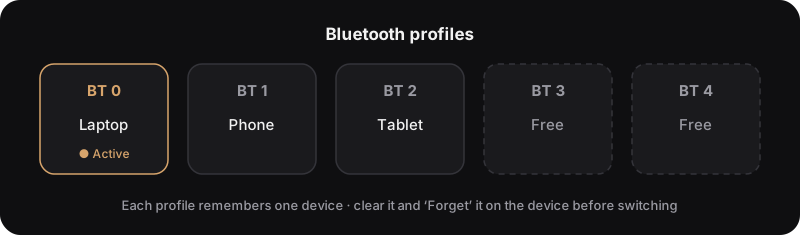
Wireless keyboards keep each paired computer, phone or tablet in its own Bluetooth profile, and switch between them with keys.
Ground rules
- 📱 One profile = one device. Pair a new device on a free profile, or clear an old one first.
- 🔁 Clear both sides: clear the profile on the keyboard and "Forget" the keyboard on the device. Clearing only one side breaks pairing.
- 🎯 Several devices may show "connected", but only the active profile's device receives keystrokes.
Bluetooth keys
| Action | ZMK | RMK (User keys in Vial) |
|---|---|---|
| Select profile 0 | &bt BT_SEL 0 | BT0 (User0) |
| Next / previous profile | &bt BT_NXT / &bt BT_PRV | User(N) / User(N+1) |
| Clear current profile | &bt BT_CLR | User(N+2), or hold BTx for 5 s |
| Clear all profiles | &bt BT_CLR_ALL | — |
| Toggle USB / Bluetooth output | &out OUT_TOG | User(N+3) |
| Default profile count | 5 | 3 (configurable) |
In the RMK column, N is the number of profiles. With the default 3: User0–2 are BT0–BT2, User3 next, User4 previous, User5 clear current, User6 toggle output.
Check your keyboard's default keymap for where these keys are.
Pair a new device
- Switch to a free profile (e.g. BT1). If none is free, pick an old one and clear it.
- On the computer or phone, open Bluetooth settings and search for new devices.
- Select the keyboard to pair.
- Type to test.
Won't connect, or connected but not typing
- Remove / Forget the keyboard in the device's Bluetooth settings.
- Clear the matching profile on the keyboard (ZMK
&bt BT_CLR; RMK hold theBTxkey for 5 seconds). - Search and pair again.
Still stuck?
- Windows: remove the keyboard in Device Manager, then toggle Bluetooth or restart.
- Weak or dropping signal: move closer, and keep USB 3.0 ports and wireless dongles away from the keyboard.
Re-pair split halves
The halves of a wireless split are paired to each other too. If one half stops responding after flashing, re-pair them: