
All guides
RMK: edit the default keymap in keyboard.toml
Change RMK's built-in default keymap, build it in the cloud and flash it. For single and split keyboards.
Last updated 2026-10-15
For everyday changes, use Vial — it's instant. To change the default keymap built into the firmware, or settings Vial doesn't expose, edit RMK's keyboard.toml, rebuild and flash.
Edit keyboard.toml → GitHub Actions builds → download .uf2 → flash
You'll need
- ✅ The maker's RMK project repository (based on rmk-project-template)
- ✅ A GitHub account
- ✅ A data-capable USB cable
Step 1: copy the repository
- Open the maker's repository and click Fork (or Use this template on a template repo).
- Enable workflows in the Actions tab.
Step 2: edit the keymap
Open keyboard.toml and find the [[keymap.layer]] sections. Each [[keymap.layer]] is a layer; the first is layer 0:
[[keymap.layer]]
keys = """
Escape  Q  W  E  R  T
Tab     A  S  D  F  G
MO(1)   Z  X  C  V  LT(1, Space)
"""

[[keymap.layer]]
keys = """
_       Kc1  Kc2  Kc3  Kc4  Kc5
_       Left Down Up   Right __
_       _    _    _    _    _
"""
- Keys follow the position order defined in
[layout], separated by spaces. _is transparent (falls through),__is no key.- Common forms:
MO(1)momentary layer,TG(1)toggle,LT(1, Space)tap Space / hold layer,MT(A, LShift)tap A / hold Shift.
Full syntax: RMK layout docs. Comparison with QMK and ZMK: Layers, keycodes and behaviors.
Step 3: build and download
- Commit; GitHub Actions starts building.
- Wait for the run to finish ✅ in Actions, open it, and download the firmware under Summary → Artifacts.
- Unzip and find the
.uf2file (.binon ESP32).
Step 4: flash
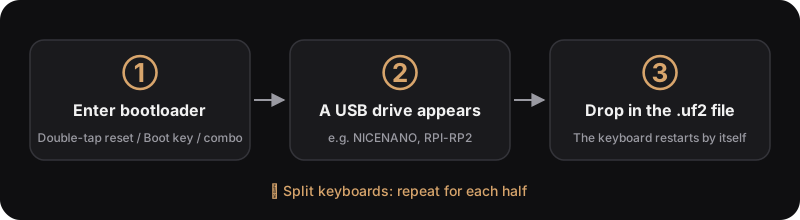
- Enter bootloader mode (e.g. double-tap reset); a USB drive appears.
- Drag the
.uf2onto it; the keyboard restarts when done.
After flashing: Vial edits vs the new default
RMK keeps Vial edits in the keyboard's storage.
- After a firmware update, storage may be re-initialized, so Vial edits are replaced by the new default keymap. Export a
.vilbackup in Vial before updating. - If the old keymap still shows after flashing, enable
clear_layout = truein the storage settings ofkeyboard.toml, build and flash once (clears keys, keeps Bluetooth pairings), then turn it off again.
Common problems
- Build fails: open the failed run to read the error; usually a row's key count doesn't match
[layout], or a key name is misspelled. - One split half is dead: check each half has its own file, then re-pair following Troubleshooting.