
All guides
Single vs split keyboards
Central and peripheral halves, which side to plug in, how many times to flash, and how the halves connect.
Last updated 2026-10-15
A single keyboard has one controller — plug it in and go. A split keyboard has a controller in each half, and they have different jobs. Knowing who does what avoids most remapping and flashing mistakes.
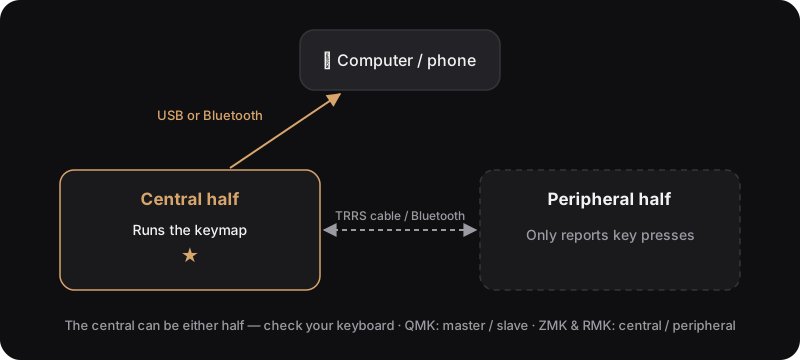
Central and peripheral
- Central half — connects to the computer (USB or Bluetooth) and runs the keymap.
- Peripheral half — only sends its key presses to the central; it never talks to the computer directly.
| QMK | ZMK | RMK | |
|---|---|---|---|
| Names | master / slave | central / peripheral | central / peripheral |
| Which half is central | The half with USB (detected by default) | Set when the firmware is built — either side | Set when the firmware is built — either side |
| Link between halves | Wired, e.g. TRRS | Bluetooth | Wired (serial) or Bluetooth |
Remapping: single vs split
| Single keyboard | Split keyboard | |
|---|---|---|
| Connect for remapping | Plug in USB | Connect the central half |
| How many times | Once | Once — the keymap is one set shared by both halves |
| Live remap with VIA / Vial / ZMK Studio | Takes effect immediately | Takes effect immediately; nothing to do on the peripheral |
| Flashing firmware | One file | Usually each half separately, with different files |
Left and right in QMK
QMK needs to know which half is which. Three common approaches:
- USB detection (default) — whichever half has USB is the master.
- Hard-coded — e.g.
MASTER_LEFT, with the same file flashed to both halves. - Handedness in EEPROM — flash with a side-specific target such as
uf2-split-left/uf2-split-right,dfu-split-left/dfu-split-right, oravrdude-split-left/avrdude-split-right.
Pairing wireless halves
On ZMK and RMK wireless splits, the halves are paired to each other too. They ship paired; if one half stops working after flashing, the pairing data usually no longer matches and needs a reset.
- ZMK: flash the
settings_resetfirmware to clear both halves, flash the normal firmware back, then reset both halves at the same time. - RMK: hold the split-peer clear key in Vial for 5 seconds, or use a build with
clear_storageenabled.
Step-by-step: Bluetooth pairing and Troubleshooting.